Lecture notes. Written from the material of Berkeley Stat 243, licensed CC BY 4.0. These are notes, not a transcript: the material has been reorganised and rewritten. This adaptation carries the same licence, and the original is linked above.
6. Debugging in R
What this covers
This chapter is about finding out why a piece of R code is not doing what you meant it to do: the tools R and RStudio give you for pausing execution and inspecting what actually happened, a catalogue of the errors and near-misses that come up often enough in R to be worth recognizing by name, and where to look when neither of those settles the question on its own. It assumes you can already write R functions and have, at some point, stared at an error message with no idea which line produced it.
Two kinds of advice, and where this material comes from
Debugging advice comes in two flavours. General advice — not specific to any language — exists independently of R; two accessible write-ups are Goldspink's Efficient Debugging and Brody's Debugging for Beginners (linked in Sources). The R-specific material below is a summary of a longer tutorial by Chris Paciorek for Berkeley's Statistical Computing Facility, which comes with its own screencast demo. Because the debugging tools are interactive — you are watching a console, not reading a script — a summary on the page necessarily loses some of what a live demo or the screencast shows; go to those if a tool's behaviour isn't clear from the description here. The SCF tutorial also has defensive-programming tips for preventing bugs, which are not repeated here.
R's debugging tools
R gives you five main tools for finding out what a misbehaving piece of code actually did, as opposed to what you assumed it did.
traceback(). Call it right after an error and it prints the call stack: the sequence of function calls that were active when the error was thrown, most recent call first. It tells you where in the chain of calls the error happened, not why.recover(). Setoptions(error = recover)and the next uncaught error drops you into a menu listing the active calls (in the reverse order totraceback()). Choose one and you get an interactive prompt running inside that call's environment — you can runls(), inspect whatever is in scope, and try things. TypeQto leave.options(error = NULL)reverts to the default behaviour.browser(). Placed inside a function body, it pauses execution at that line and drops you into an interactive interpreter running in the function's own environment, from which you can step through the remaining lines one at a time and watch the objects change.debug(f)/undebug(f)/debugonce(f).debug(f)inserts abrowser()call at the first line off, so every subsequent call tofstarts in step-through mode;undebug(f)removes it again (or just close the R session).debugonce(f)does the same for exactly one call, so there is nothing to remember to switch off.trace(f, edit = TRUE)/untrace(f). Opensffor a temporary edit — you can change its body (add a print statement, change what it returns) without touching the source file. The edit disappears when the session ends, or immediately onuntrace(f).
Worked example: chasing a bug through gamma_jackknife
The running example fits a gamma distribution to data and jackknifes the resulting estimate's standard error:
library(MASS)

gamma_est <- function(data) {
  # this fits a gamma distribution to a collection of numbers
  m <- mean(data)
  v <- var(data)
  s <- v/m
  a <- m/s
  return(list(a = a, s = s))
}

calc_var <- function(estimates) {
  var_of_ests <- apply(estimates, 2, var)
  return(((n - 1)^2 / n) * var_of_ests)
}

gamma_jackknife <- function(data) {
  ## jackknife the estimation
  n <- length(data)
  jack_estimates <- gamma_est(data[-1])
  for (omitted_point in 2:n) {
    jack_estimates <- rbind(jack_estimates, gamma_est(data[-omitted_point]))
  }
  jack_var <- calc_var(jack_estimates)
  return(sqrt(jack_var))
}

# jackknife gamma dist. estimates of cat heart weights
gamma_jackknife(MASS::cats$Hwt)
Calling it produces an error, and it isn't obvious from the message alone which of the three functions is at fault. The tools above answer that in stages, each one narrowing down the question the previous one leaves open:
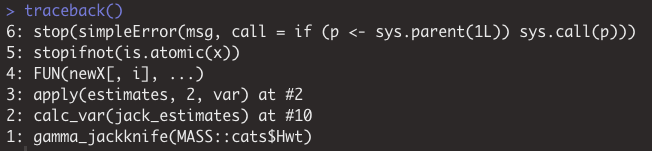
traceback()shows the stack of calls leading up to the error. It points to a call insideapply, reached fromcalc_var()— so the error is happening whileapplytries to compute a column variance, not ingamma_estor in the jackknife loop itself.
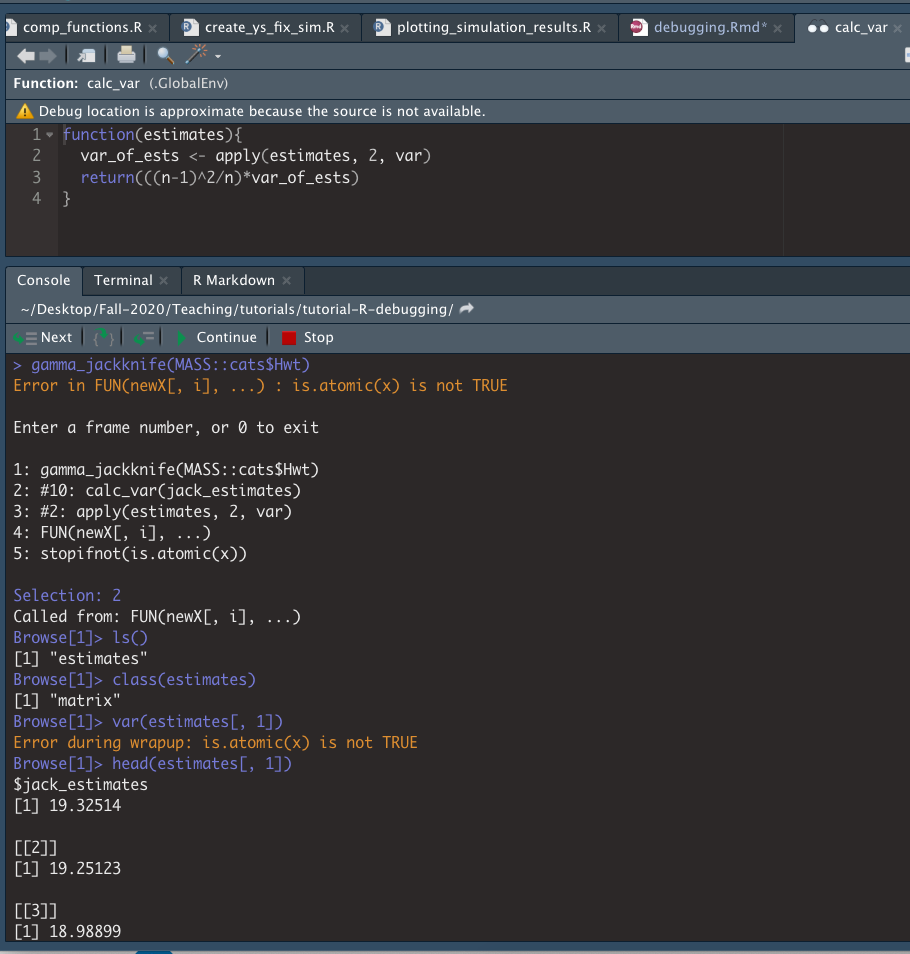
recover()(withoptions(error = recover)set) lets you actually step into that call. Entering thecalc_varframe and runningls()shows the only object in scope isestimates, a matrix — and trying to compute the variance of one of its columns triggers the sameis.atomic(x)error. Looking at the column shows it is a list, not a numeric vector:applyis being handed something it cannot take a variance of.
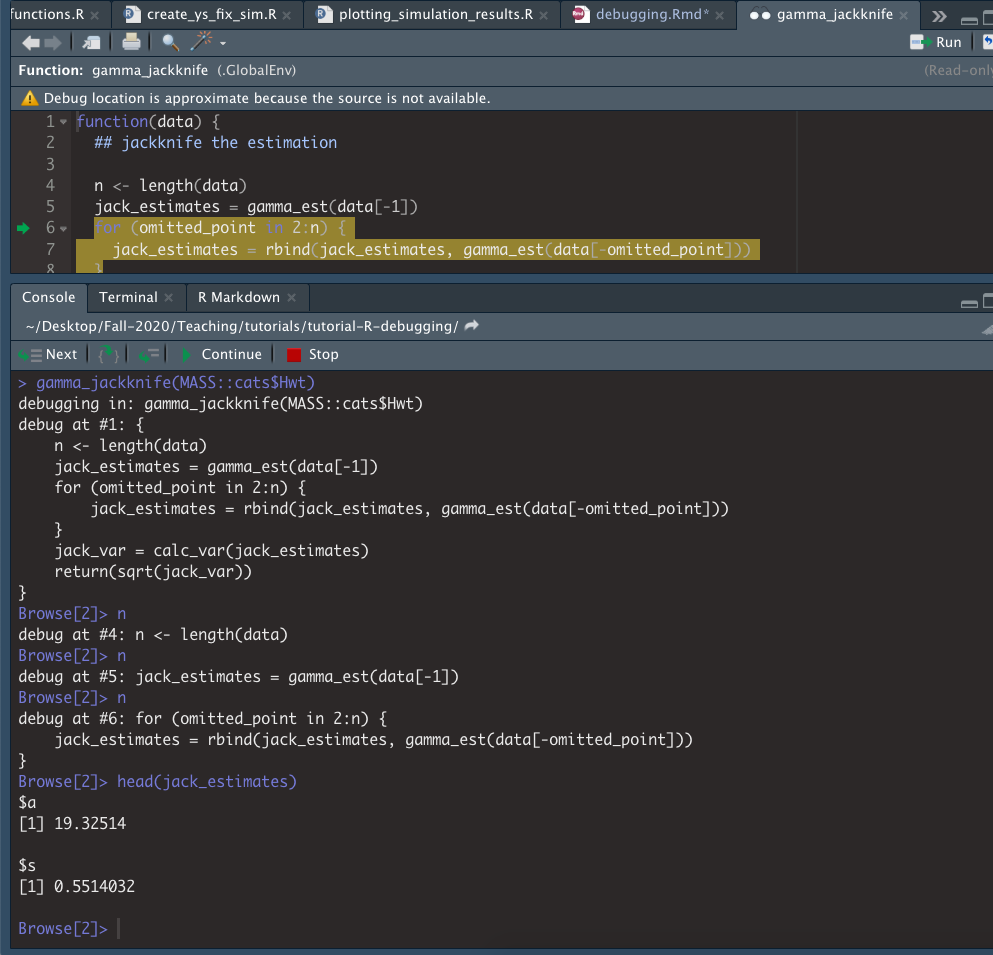
- That still leaves the question of why
estimatescontains list-valued columns.debug()answers it:debug(gamma_jackknife)followed by another call steps through the jackknife loop one line at a time, and it becomes clear thatgamma_est()returns a list (list(a = a, s = s)), andrbind-ing a sequence of lists together produces a matrix of list columns rather than a numeric matrix — which is exactly whatcalc_varthen chokes on.
The pattern worth keeping from this example is the division of labour between the tools:
traceback() for where, recover() for inspecting state at the point of failure without
otherwise changing anything, and debug()/browser() for watching state change as the code
runs when the failure itself doesn't pin down the cause.
Common errors worth recognizing
Most R errors are not exotic; they recur because a handful of R's design choices create consistent traps. Recognizing the shape of the error is often faster than re-deriving it from first principles.
- Mismatched parentheses.
[[...]]versus[...]on a list return different things —[...]keeps the list structure (a sub-list),[[...]]extracts the element itself:
myList <- list("A" = 1:10, "B" = 11:20)

# one set of brackets: still a list of length 1
cat("Type: ", typeof(myList[1]), "\nLength: ", length(myList[1]), sep = "")

# two sets: the element itself, a vector of length 10
cat("Type: ", typeof(myList[[1]]), "\nLength: ", length(myList[[1]]), sep = "")
==versus=.- Comparing real numbers exactly with
==. Numbers on a computer are stored to limited precision, so two values that are mathematically equal need not compare equal:
1/3 == 4*(4/12 - 3/12)                       # FALSE

# default tolerance is sqrt(.Machine$double.eps)
all.equal(target = 1/3, current = 4*(4/12 - 3/12))   # TRUE
- Expecting a single value but getting a vector, particularly inside an
if, which silently uses only the first element of its condition rather than raising an error:
x <- 1:10
y <- 1:5

if (x == y) {          # compares only x[1] to y[1]
  print("Equal")
} else {
  print("Not equal")
}

if (identical(x, y)) { # compares the whole objects
  print("Equal")
} else {
  print("Not equal")
}
identical() or all.equal() are the safe way to compare whole vectors.
- Silent type conversion where none was wanted, or missing coercion where it was expected —
e.g. read.csv()'s stringsAsFactors argument changing what type a column comes in as.
- Using the wrong function or variable name.
- Passing unnamed arguments to a function in the wrong order.
- Putting else on its own line after a closing } that is not itself wrapped in braces. R
parses the if branch as a complete, valid statement, executes it, and only then encounters a
stray else with nothing to attach to — producing an error rather than the branching you meant.
- Forgetting to define a variable inside a function, so that R's lexical scoping quietly finds
a variable of the same name in an enclosing (often global) environment instead of raising an
error. At best this is a type mismatch and an obvious error; at worst it is a garbage value used
silently, which is hard to trace back. The dangerous version of this bug works fine while you
are developing the code — because the stray variable happens to exist in your session — and then
breaks after a restart, or on someone else's machine, when it doesn't. The defence is to clear
the environment before testing (rm(list = ls()); gc()) and to restart the R session and rerun
the code before trusting it.
- R silently dropping matrix and array dimensions that it judges extraneous, which can confuse
code downstream that expects an object of a particular shape:
myMat <- matrix(data = 1:9, nrow = 3, ncol = 3)

dim(myMat[1, ])                  # NULL — dropped to a plain vector
dim(myMat[1, , drop = FALSE])    # 1 3 — dimensions kept
Getting help online
Whatever error you have hit, there is a good chance someone else has already hit it and posted about it.
- Plain web search, prefacing the query with "in R" or "R" to filter out results for other languages.
- Stack Overflow, where R questions are tagged
r(http://stackoverflow.com/questions/tagged/r). - R special-interest-group (SIG) mailing lists — e.g.
r-sig-hpcfor high-performance computing,r-sig-macfor R on Macs — searchable by including the SIG's name in the query. - Rseek.org, a web search restricted to sites with R content.
- The R mailing list archive for R-help itself.
These forums are just as useful for learning how to do something as for fixing a bug — one example given is a blog post building a guide to R entirely out of Stack Overflow answers (see Sources).
If a search of the archives turns up nothing, the R-help mailing list (and the other lists above) will often answer a genuine question, subject to some etiquette that is common to technical mailing lists generally, not just R's:
- Search the archives and check the relevant manuals or a book such as Advanced R first.
- Reduce the problem to its essence — a minimal example, together with the actual output and error message, rather than a description of the surrounding project.
- State the R version, operating system, and OS version in use;
sessionInfo()andSys.info()print exactly this. - Read the R mailing list posting guide before posting.
The R mailing lists give you free access to some of the most knowledgeable people in the R world, including members of the R core development team — but the trade is that you are expected to have done your homework first, and a response that amounts to "read the manual" is not unusual. It is, on balance, a reasonable trade for the level of expertise on offer.
Exercises
logitBoot(). logitBoot(y, x) is meant to bootstrap the standard error of the slope
coefficient in a logistic regression of y (0/1) on a continuous predictor x. Fitting the model
directly,
gives a standard error on the x coefficient of around 3. But
logitBoot <- function(y, x, n_boot = 2000) {
  set.seed(5)
  # do n_boot random permutations of x and y and return coefficient on x with
  # the myGLM function
  boot_coefs <- sapply(seq_len(n_boot), myGLM, y, x)
  # compute standard deviation of those estimates and return
  boot_se <- sd(boot_coefs)
  return(boot_se)
}

myGLM <- function(i, y, x) {
  n <- length(y)
  # randomly sample with replacement from the observations in the data
  boot_sample <- sample(seq_len(n), n, replace = TRUE)
  # create vectors of the bootstrapped samples
  x_boot <- x[boot_sample]
  y_boot <- y[boot_sample]
  # fit logistic regression on permuted data
  mod_boot <- glm(y_boot ~ x_boot, family = "binomial")
  # return the estimated coefficient
  return(mod_boot$coef[2])
}

logitBoot(my_data$y, my_data$x)
returns a bootstrapped standard error of over 100, together with a warning. Using the debugging tools from this chapter, find out what is producing the discrepancy. As a guide, if you want to work through it in stages rather than from scratch:
- Load
data.csv(columnsy, 0/1, and continuousx) and confirm the two numbers above. - Use
debug(logitBoot)and re-runlogitBoot(my_data$y, my_data$x). Step through untilboot_coefshas been computed, then userange()andquantile()on it to see which bootstrap replicate(s) are producing extreme values, and find the index of the offending replicate. - Use
trace(myGLM, edit = TRUE)to makemyGLMreturn the coefficient together with they_bootandx_bootit used, andtrace(logitBoot, edit = TRUE)to changesapplytolapplyso you can retrieve that richer output. Re-run and step through to the offending replicate, and look directly at the resampled data — in particular, at whatx_bootlooks like for the observations wherey_boot = 1. - Explain why that particular resample causes
glm()to behave the way it does, and (time permitting) suggest a fix.
When finished, remove the temporary edits with untrace(logitBoot) and untrace(myGLM).
Sources
All of this chapter comes from the STAT 243 (Berkeley, Fall 2021) section 4 material on
debugging, converted from sections/04/debugging.Rmd (CC0-1.0):
- "Two kinds of advice" and tool overview —
01-useful-links.md. - R's debugging tools and the
gamma_jackknifeworked example, including the three screenshots —02-r-s-debugging-tools.md. - Common errors catalogue and code snippets —
03-common-errors.md. - Getting help online —
04-getting-help-online.md. - The
logitBoot()exercise —05-group-problem-for-section-logitboot.md, cut off before the instructor's own diagnosis and fix, and before the further, unresolved observation that the corrected code appears to underestimate the standard error.
Material the lecture pointed to but that is not itself reproduced here: Goldspink's Efficient
Debugging, Brody's Debugging for Beginners, the Advanced R debugging chapter (Wickham), the
RStudio debugging-techniques video, the Berkeley-SCF tutorial-R-debugging GitHub repository and
its accompanying screencast, the "guerrilla guide to R" blog post built from Stack Overflow
answers, and the R mailing list posting guide. No slides or lecture transcript were supplied for
this section — the source is the instructor's own written section notes.
← 5. Code Review and Homework Habits · Contents · 7. First Three Weeks Logistics →